EC2 Master/Worker Process Queue
https://github.com/bitofsky/skills/tree/main/ec2-process-queue
TLDR;
Install Skill
npx skills add https://github.com/bitofsky/skills/tree/main/ec2-process-queueTo AI: 해줘
/ec2-process-queue 이 스킬을 사용해 ec2 c8i-large 인스턴스 10대로 어떠어떠한 작업을 진행해줘EC2 Master/Worker Process Queue
이 문서는 대량의 독립 작업을 EC2 여러 대에 분산해서 실행하는 master/worker 큐 구조를 설명한다. 특정 업무 도메인이나 처리 내용은 중요하지 않다. 핵심은 “매우 많은 process target을 로컬 큐에 넣고, EC2 worker slot에 균등하게 분배해서, 병렬로 처리하고, 진행 상황을 회수/모니터링하는 방법”이다.
예를들어 s3에 있는 수많은 파일을 EC2 worker 여러 대에서 병렬로 처리하는 상황을 상상해보자. 이 문서에서 설명하는 구조는 이런 유형의 작업에 적합하다.
Local에서 전체 target 목록을 관리하는 master가 있고, 다른 리전의 여러 EC2 인스턴스에 worker slot을 만들어서 master가 local queue에서 target을 pop해서 각 slot의 remote next에 채워준다. 각 worker는 자기 slot의 next에서 하나씩 pop해서 처리한다. worker는 성공/실패를 slot별 파일에 남긴다. monitor는 SSM으로 모든 slot의 상태를 주기적으로 읽어서 진행 상황을 보여준다.
이를 통해 EC2의 네트워크, 디스크 I/O, CPU 같은 리소스를 최대한으로 사용하면서 실시간으로 진행 상황을 모니터링할 수 있고, EC2와 EBS 증가만으로 동시 처리량을 쉽게 늘릴 수 있다.
이 문서는 사람이 읽고 이해하고 쓰기보단 AI에게 제공하고 필요한 준비작업을 AI가 수행하며, 사람은 오직 모니터링 스크립트만 실행해 실행상태 체킹만 하는데 사용하기 위함이다.
이 문서에서 사용하는 용어는 다음과 같다.
| 용어 | 의미 |
|---|---|
| process target | 처리할 작업 1개를 나타내는 문자열. 보통 URI, key, id 같은 한 줄짜리 값이다. |
| local queue | 아직 EC2에 dispatch되지 않은 target 목록 파일. |
| master | 로컬에서 실행되는 큐 refill 프로세스. |
| worker slot | EC2 내부의 독립 작업 디렉토리. 예: /1, /2, /3. |
| worker | worker slot 하나를 담당하는 장기 실행 프로세스. |
| remote next | 각 worker slot에 있는 대기 큐 파일. |
| status | worker slot의 현재 진행 상태를 나타내는 한 줄짜리 파일. |
반드시 챙길 것
이 구조는 단순하지만, 아래 항목을 놓치면 target 중복 처리, target 유실, 잘못된 인스턴스 종료, 실패 원인 추적 불가 같은 문제가 생긴다. AI가 이 문서를 보고 작업을 수행할 때는 이 섹션을 먼저 확인해야 한다.
Queue Lock
- local queue에서 target을 pop할 때는 반드시
flock "$QUEUE_FILE.lock"을 사용한다. - remote
next에서 worker가 target을 pop할 때는 반드시 slot별next.lock을 사용한다. - master가 remote
next에 append할 때도 반드시 해당 slot의next.lock을 잡는다. - lock 없이
head,tail,mv,cat >> next를 수행하면 master refill, worker pop, 재분배가 겹칠 때 target이 중복되거나 사라질 수 있다.
Atomic Write
next를 수정할 때는 임시 파일에 쓴 뒤mv로 교체한다.status갱신은 반드시 고유 임시 파일에 쓴 뒤mv -f로 교체한다.status.$$처럼 PID 기반 고정 파일명을 쓰면 background monitor와 main process가 동시에 status를 쓸 때 race가 날 수 있다.- 권장 형태:
tmp="$(mktemp "${status_file}.XXXXXX")"
printf "%s\n" "$(date -Is) phase=running target=$target" > "$tmp"
mv -f "$tmp" "$status_file"
Target Record
- queue record 하나는 반드시 한 줄이어야 한다.
- TSV/NDJSON을 써도 literal newline은 넣지 않는다.
- shell에서 target record는 항상 quote한다.
- target record에 민감한 값이 들어가면
logs,status,ps,pgrep -af출력에 노출될 수 있으므로 넣지 않는 것을 원칙으로 한다.
Dispatch Audit
- master가 local queue에서 target을 pop하고 remote
nextappend에 성공했으면target_process.dispatched에 기록한다. - remote append 실패 시 pop했던 target은 local queue 앞으로 되돌린다.
dispatched는 “완료”가 아니라 “EC2에 넘김” 기록이다. 완료 여부는 remotecompleted와 output/result 검증으로 판단한다.
Worker Slot Isolation
- 한 worker process는 하나의
REMOTE_DIR만 소유한다. - 같은 slot에 worker process를 중복 실행하지 않는다.
- EC2 한 대에 여러 worker를 둘 때는
/1,/2,/3처럼 디렉토리를 분리한다. - 각 slot은 자기
next,completed,failed,status,tmp,logs만 사용해야 한다.
Process Result Validation
- process script가 결과물을 만든다면 다음 단계로 commit/publish/write 하기 전에 결과물이 실제로 존재하고 0 byte가 아닌지 확인한다.
- 외부 명령으로 결과물을 만들면 stdout/stderr를 임시 로그에 남긴다.
- 실패 시 worker log에 원인이 남아야 나중에 재시도 여부를 판단할 수 있다.
- process script는 이미 처리된 target을 만나면 skip하고 성공 처리할 수 있게 만드는 것이 좋다.
Monitor Semantics
NEXT는 아직 실행에 들어가지 않은 remote 대기 target 수다.- 현재 실행 중인 target은
NEXT에 포함되지 않는다. CPU,RX/s,TX/s는 slot별 값이 아니라 인스턴스 단위 값이다. 같은 EC2의 여러 slot 행에 동일하게 반복 표시된다.completed와failed는 slot별 누적 파일이다.- 실패 target을 재시도해서 성공해도 기존
failed줄 수는 자동으로 줄지 않는다. - 재시도 성공 여부는 output/result 존재 여부, retry 후
completed기록, 또는 별도 검증으로 확인한다.
Instance Termination
- EC2 종료 조건은 “해당 인스턴스의 모든 slot이
NEXT=0이고phase=idle”일 때다. - 일부 slot만 idle이면 종료하면 안 된다.
status가 오래된uploading,committing,running상태라면 실제 프로세스 확인이나 output/result 확인 없이 종료하지 않는다.- 종료 전 필요한 경우 remote
next와 현재 target을 회수한다. - 종료 후에는
process-workers.instances와workers에서 해당 instance-id를 제거한다.
Rebalance
- local queue가 비었는데 일부 EC2에 heavy target의 remote
next가 몰릴 수 있다. - 재분배는 현재 실행 중인 target이 아니라 아직 실행 전인 remote
next만 대상으로 한다. - 재분배 전 master를 중단한다.
- 모든 remote
next를flock으로 drain하고, idle slot에 round-robin으로 append한다. - drain/assignment 결과는 파일로 남긴다.
Security
- secret은 queue record, status, logs, command line에 넣지 않는다.
- process에 secret이 필요하면 SSM Parameter Store, IAM Role, instance metadata 같은 별도 경로로 주입한다.
ps,pgrep -af, worker log가 command line 인자를 노출할 수 있음을 고려한다.
권장 파일 구성
유사한 작업을 새로 구성할 때는 아래와 같은 역할 기반 이름을 사용하는 것을 권장한다. 핵심은 파일명 자체가 아니라 역할 분리다.
| 역할 | 권장 파일 |
|---|---|
| process 실행 스크립트 | scripts/process-target.sh |
| worker loop | scripts/process-worker.sh |
| master refill | scripts/process-master-refill.sh |
| worker monitor | monitor-process-workers.sh |
| EC2 bootstrap user-data | scripts/ec2-bootstrap-process-workers.sh |
| 인스턴스 목록 | process-workers.instances |
| worker slot 목록 | workers |
| local queue | target_process.queue |
| dispatch audit log | target_process.dispatched |
기존 구현을 재사용할 때 파일명이 다르다면, 이 문서의 process-* 이름을 실제 파일명에 맞춰 치환해서 사용하면 된다.
전체 구조
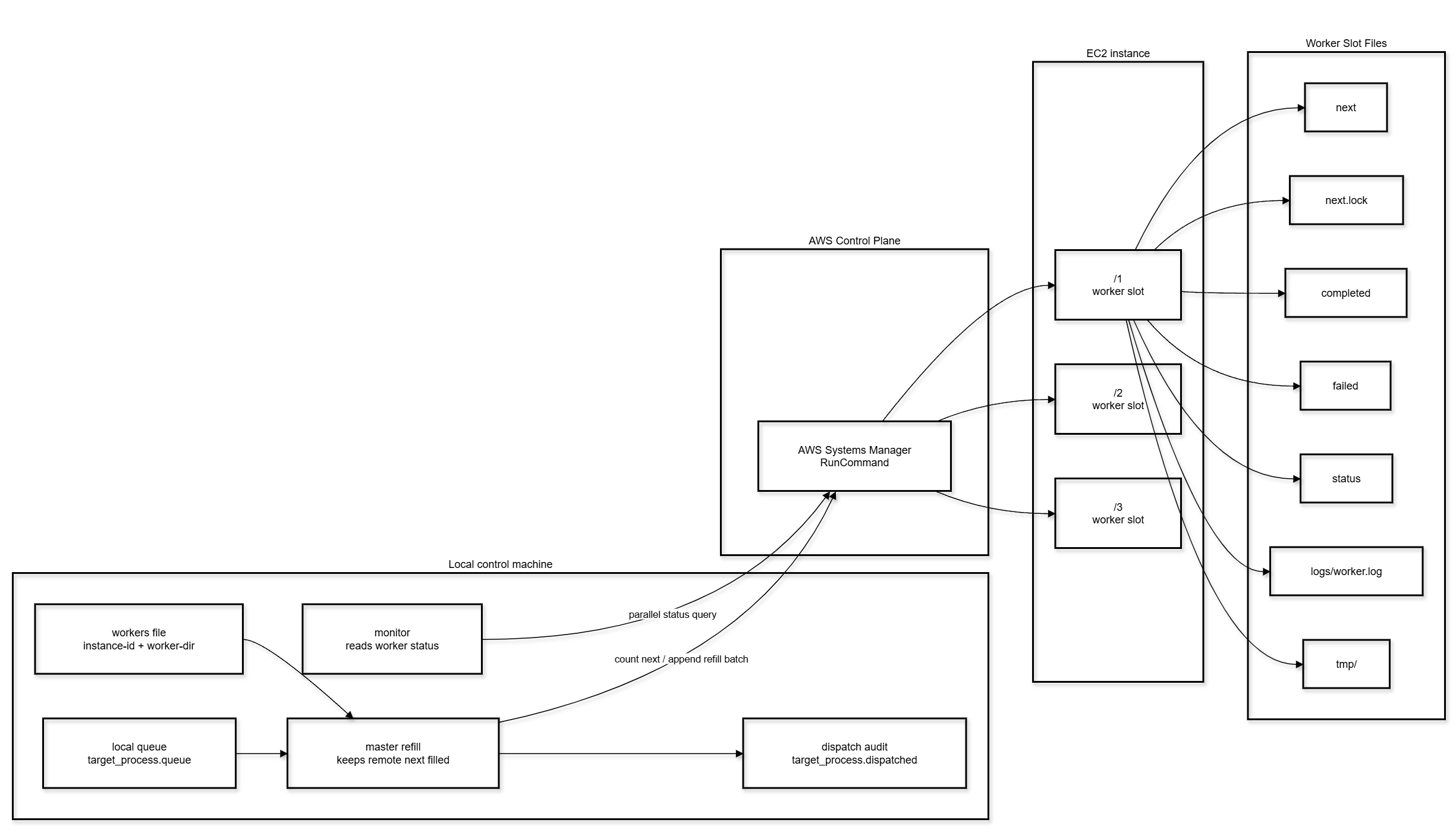
기본 아이디어
작업은 두 단계 큐로 관리한다.
- 로컬 master가 큰 전체 큐를 가진다.
- master는 각 EC2 worker slot의
next파일을 작게 채워준다. - 각 worker는 자기 slot의
next에서 하나씩 pop해서 처리한다. - worker는 성공/실패를
completed,failed에 남긴다. - monitor는 SSM을 통해 모든 slot의
status를 읽는다.
이 구조의 장점:
- SSH 없이 SSM만으로 배포/실행/모니터링할 수 있다.
- EC2 한 대에 여러 worker slot을 둘 수 있다.
- master를 중단해도 이미 remote
next에 들어간 작업은 계속 진행된다. - worker별
next가 작기 때문에 특정 인스턴스를 종료할 때 회수해야 할 범위가 제한된다. - local queue pop과 remote next pop은 모두
flock으로 보호한다.
큐 계층
Local Queue
예시 파일:
target_process.queue현재 구현 파일:
target_process.queue형식:
target-1
target-2
target-3
특징:
- 한 줄이 process target 하나다.
- master만 이 파일에서 pop한다.
- 병렬 master refill 과정에서 동시에 접근할 수 있으므로
target_process.queue.lock형태의 lock 파일을 사용한다. - dispatch에 성공한 target은 audit log에 남는다.
Remote Next Queue
각 EC2 worker slot에는 next 파일이 있다.
/1/next
/2/next
/3/next
특징:
- 한 줄이 process target 하나다.
- worker가 하나씩 pop한다.
- pop은
next.lock으로 보호한다. - master는 각
next파일의 줄 수가MAX_NEXT보다 작으면 부족분만 append한다.
Worker Slot 디렉토리
한 EC2 인스턴스에 여러 worker slot을 둘 수 있다. 현재 구조는 인스턴스당 3개 slot을 사용한다.
/1
/2
/3
각 slot의 구성:
next
next.lock
completed
failed
status
logs/worker.log
tmp/
worker script
process script
slot은 서로 독립적이다. 같은 EC2 안에서도 /1, /2, /3 worker가 동시에 실행된다.
처리 흐름
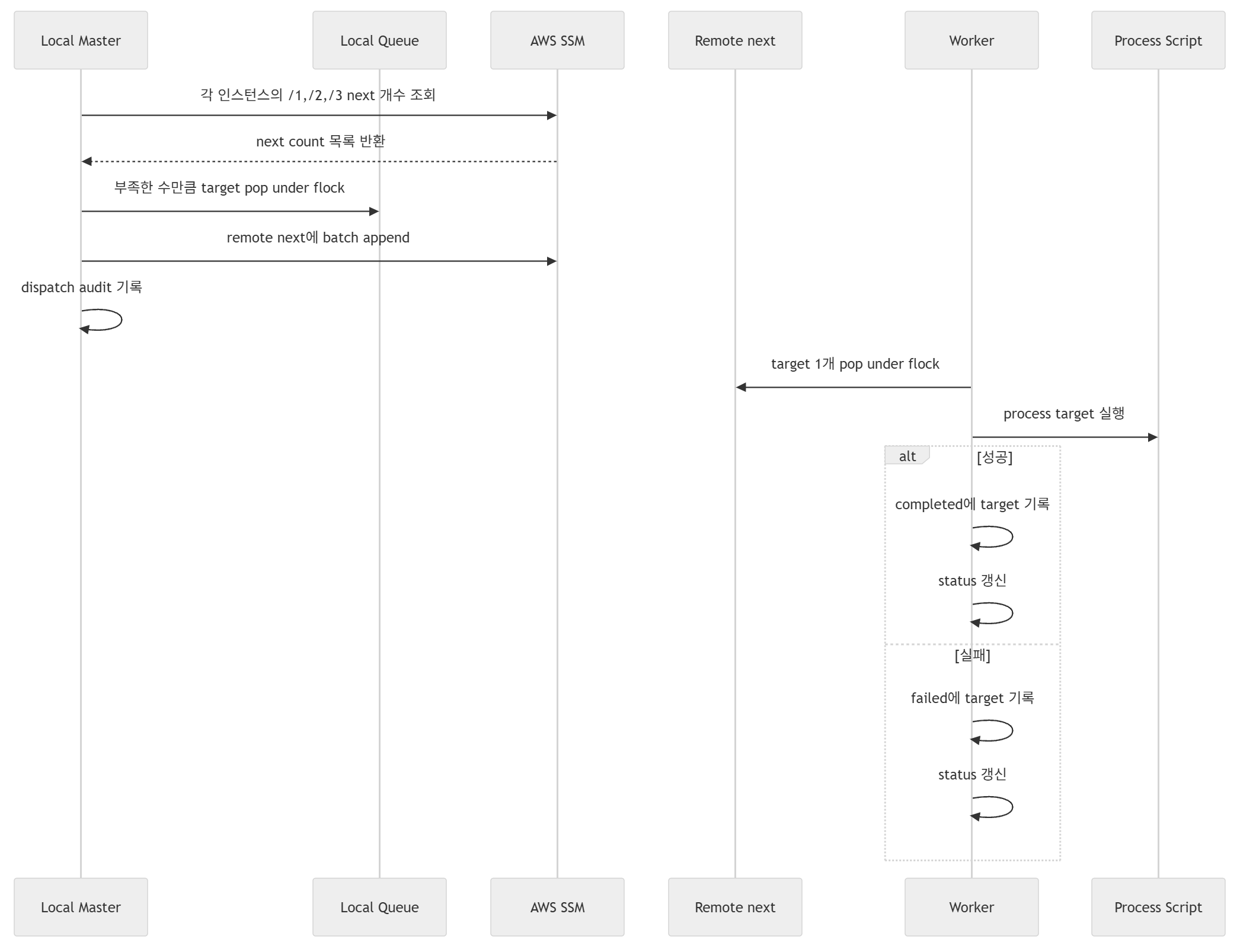
Master Refill 동작
master는 로컬에서 실행된다.
역할:
workers파일을 읽는다.- 같은 instance-id에 속한 worker dirs를 그룹화한다.
- 각 인스턴스에 SSM command를 한 번 보내
/1,/2,/3의next줄 수를 조회한다. - 여러 인스턴스 조회/리필을 병렬로 실행한다.
- 부족한 수만큼 local queue에서 pop한다.
- pop한 target을 remote next에 append한다.
- dispatch audit log를 기록한다.
- 실패 시 pop했던 target을 local queue 앞으로 되돌린다.
주요 환경변수:
| 변수 | 기본값 | 설명 |
|---|---|---|
WORKERS_FILE |
empty | worker slot 목록 파일. 보통 workers. |
INSTANCES_FILE |
process-workers.instances |
instance-id 목록 파일. WORKERS_FILE이 없을 때 사용. |
QUEUE_FILE |
target_process.queue |
local queue 파일. |
DISPATCHED_FILE |
target_process.dispatched |
dispatch audit log. |
MAX_NEXT |
5 |
worker slot별 remote next를 최대 몇 개까지 채울지. |
REFILL_PARALLELISM |
20 |
master가 동시에 처리할 인스턴스 수. |
INTERVAL_SECONDS |
30 |
refill pass 사이의 대기 시간. |
ONCE |
0 |
1이면 한 번만 refill하고 종료. |
foreground 실행:
WORKERS_FILE=workers \
QUEUE_FILE=target_process.queue \
MAX_NEXT=5 \
REFILL_PARALLELISM=10 \
INTERVAL_SECONDS=10 \
scripts/process-master-refill.sh
중단:
Ctrl-Cmaster를 중단해도 remote next에 이미 들어간 target은 worker가 계속 처리한다.
한 번만 refill:
ONCE=1 \
WORKERS_FILE=workers \
QUEUE_FILE=target_process.queue \
MAX_NEXT=5 \
REFILL_PARALLELISM=10 \
scripts/process-master-refill.sh
Worker 동작
worker는 EC2의 특정 slot 디렉토리에서 계속 실행된다.
동작 순서:
REMOTE_DIR로 이동한다.- 필요한 디렉토리와 파일을 만든다.
- process 실행에 필요한 runtime secret/config를 읽어 환경변수로 준비한다.
- 무한 루프를 돈다.
next에서 target 하나를flock으로 pop한다.- process script를 실행한다.
- 성공하면
completed에 기록한다. - 실패하면
failed에 기록한다. - 대기 target이 없으면
status에phase=idle을 쓰고 sleep한다.
slot별 로그:
/N/logs/worker.logslot별 상태:
/N/status예시 status:
2026-04-28T06:49:04+00:00 phase=running pct=54% bytes=32979288064 total=60108212049 target=...Process Script 규약
process script는 target 하나를 받아 처리하는 단일 작업 실행기다.
권장 규약:
- 인자는 target 하나만 받는다.
- 성공 시 exit code
0. - 실패 시 non-zero.
- 진행 상황을
PROCESS_STATUS_FILE같은 status file 환경변수로 주기적으로 기록한다. - status file 갱신은 반드시 원자적으로 한다. 고정된 임시 파일명은 쓰지 말고
mktemp "${PROCESS_STATUS_FILE}.XXXXXX"같은 고유 임시 파일에 쓴 뒤mv -f로 교체한다. - 임시 파일은 slot의
tmp/하위에 만든다. - 작업 종료 시 가능한 한 임시 파일을 정리한다.
- 이미 처리된 target이라면 skip하고 성공 처리할 수 있어야 한다.
- process 결과를 다음 단계로 commit/publish/write 하기 전에 결과물이 실제로 존재하고 0 byte가 아닌지 확인한다.
- 외부 명령을 실행해 결과 파일을 만드는 경우, stdout/stderr를 slot의 임시 로그 파일에 남기고 실패 시 worker log로 노출되게 한다.
- process 내부에서 background monitor를 같이 돌릴 경우, monitor와 main process가 같은 status file을 동시에 갱신할 수 있으므로 status write helper가 concurrent-safe해야 한다.
현재 구현에서는 process script가 다음 식으로 worker에서 호출된다.
PROCESS_STATUS_FILE="${REMOTE_DIR}/status" ./process-script.sh "$target"현재 파일명은 다음과 같다.
PROCESS_STATUS_FILE="${REMOTE_DIR}/status" ./process-target.sh "$target"새로운 작업으로 재사용할 때는 이 script만 교체하면 master/worker queue 구조는 그대로 사용할 수 있다.
EC2 구성
현재 사용한 예시:
instance type: c8i.large
root volume: gp3
size: 1000 GiB
IOPS: 3000
throughput: 500 MB/s
worker slots per instance: 3
대량 파일 I/O 또는 큰 임시 파일을 다루는 process라면 gp3 기본 throughput은 병목이 될 수 있다. iostat로 확인하면서 throughput을 조정한다.
인스턴스 생성 예시:
aws ec2 run-instances \
  --region us-east-1 \
  --image-id "$AMI_ID" \
  --instance-type c8i.large \
  --count 10 \
  --subnet-id "$SUBNET_ID" \
  --security-group-ids "$SG_ID" \
  --iam-instance-profile Name="$PROFILE" \
  --user-data file://scripts/ec2-bootstrap-process-workers.sh \
  --block-device-mappings '[{"DeviceName":"/dev/xvda","Ebs":{"VolumeSize":1000,"VolumeType":"gp3","Iops":3000,"Throughput":500,"Encrypted":true,"DeleteOnTermination":true}}]' \
  --tag-specifications \
    'ResourceType=instance,Tags=[{Key=Name,Value=process-workers},{Key=Project,Value=process-queue}]' \
    'ResourceType=volume,Tags=[{Key=Name,Value=process-workers},{Key=Project,Value=process-queue}]' \
  --query 'Instances[].InstanceId' \
  --output text
인스턴스 목록과 Worker Slot 목록
process-workers.instances는 instance-id만 담는다.
i-aaaaaaaaaaaaaaaaa
i-bbbbbbbbbbbbbbbbbworkers는 instance-id와 slot dir을 담는다.
i-aaaaaaaaaaaaaaaaa /1
i-aaaaaaaaaaaaaaaaa /2
i-aaaaaaaaaaaaaaaaa /3
i-bbbbbbbbbbbbbbbbb /1
i-bbbbbbbbbbbbbbbbb /2
i-bbbbbbbbbbbbbbbbb /3
생성 명령:
: > workers
while read -r id; do
  printf '%s /1\n%s /2\n%s /3\n' "$id" "$id" "$id" >> workers
done < process-workers.instances
Worker 배포
process script와 worker script를 임시 위치에 올린 뒤 SSM으로 각 EC2에 배포한다.
aws s3 cp scripts/process-target.sh \
  s3://YOUR_BUCKET/_tmp/process-workers/process-target.sh \
  --region us-east-1 \
  --only-show-errors

aws s3 cp scripts/process-worker.sh \
  s3://YOUR_BUCKET/_tmp/process-workers/process-worker.sh \
  --region us-east-1 \
  --only-show-errors
배포 및 실행:
aws ssm send-command \
  --region us-east-1 \
  --instance-ids $(tr '\n' ' ' < process-workers.instances) \
  --document-name AWS-RunShellScript \
  --comment deploy-start-process-workers \
  --parameters commands='[
    "set -euo pipefail",
    "for d in /1 /2 /3; do mkdir -p \"$d/logs\" \"$d/tmp\"; aws s3 cp s3://YOUR_BUCKET/_tmp/process-workers/process-target.sh \"$d/process-target.sh\" --region us-east-1 --only-show-errors; aws s3 cp s3://YOUR_BUCKET/_tmp/process-workers/process-worker.sh \"$d/process-worker.sh\" --region us-east-1 --only-show-errors; chmod +x \"$d/process-target.sh\" \"$d/process-worker.sh\"; touch \"$d/next\" \"$d/completed\" \"$d/failed\"; done",
    "for d in /1 /2 /3; do if ! pgrep -af \"REMOTE_DIR=$d .*process-worker.sh\" >/dev/null; then nohup bash -lc \"REMOTE_DIR=$d AWS_REGION=us-east-1 $d/process-worker.sh\" >> \"$d/logs/worker.log\" 2>&1 & fi; done",
    "sleep 2",
    "pgrep -af process-worker.sh | wc -l"
  ]' \
  --query 'Command.CommandId' \
  --output text
주의:
- local에 있는 파일명과 EC2에 배포되는 파일명은 worker script 내부 호출명과 일치해야 한다.
- 범용화하려면 worker script 내부의 process script 파일명도 같이 변경한다.
모니터링
watch -n 5 'WORKERS_FILE=workers ./monitor-process-workers.sh'monitor는 다음 방식으로 동작한다.
workers를 instance-id 기준으로 그룹화한다.- 인스턴스마다 SSM command 1개를 보낸다.
- 여러 인스턴스는 병렬로 조회한다.
- 각 slot의
next,completed,failed,status를 출력한다. - 인스턴스 단위
CPU,RX/s,TX/s를 함께 출력한다. - 리소스 지표는 SSM command 내부에서 약 1초 샘플링하므로 monitor 실행 시간이 1초 정도 늘어난다.
출력 예시:
INSTANCE               DIR          NEXT  COMPLETED   FAILED     CPU       RX/s       TX/s  STATUS
i-xxx                  /1              2        100        0   82.4%  120.0MB/s   40.0MB/s  2026-04-28T06:49:04+00:00 phase=running pct=54% target=...
i-xxx                  /2              0        103        1   82.4%  120.0MB/s   40.0MB/s  2026-04-28T06:49:03+00:00 phase=idle next=0

TOTAL next=20 completed=1676 failed=5NEXT는 아직 실행에 들어가지 않은 remote 대기 target 수다. 현재 실행 중인 target은 NEXT에 포함되지 않는다.
CPU, RX/s, TX/s는 같은 인스턴스의 모든 slot 행에 동일하게 표시된다.
상태 Phase
process script가 어떤 phase를 기록할지는 작업마다 다르다. 권장 phase는 다음과 같다.
| phase | 의미 |
|---|---|
idle |
worker가 대기 중이다. |
preparing |
process 실행 준비 중이다. |
running |
실제 process 실행 중이다. |
committing |
결과를 최종 위치나 다음 단계로 반영하는 중이다. |
done |
성공 완료. |
skipped |
이미 처리된 target이라 건너뜀. |
failed |
실패. |
현재 process script가 더 구체적인 phase를 출력해도 monitor는 그대로 문자열로 보여준다.
로그와 파일
로컬:
target_process.queue
target_process.queue.lock
target_process.dispatched
target_process.dispatched.lock
logs/master.log          # background 실행 시 선택
remote slot:
/N/next
/N/next.lock
/N/completed
/N/failed
/N/status
/N/logs/worker.log
/N/tmp/
dispatch audit log 형식:
timestamp instance-id remote-dir target중단과 복구
Master 중단
foreground 실행 중이면:
Ctrl-Cmaster를 멈춰도 remote next에 들어간 작업과 현재 실행 중인 worker는 계속 진행된다.
Worker 강제 중단
인스턴스를 종료하거나 작업 구조를 바꿀 때는 먼저 remote에 남은 작업을 회수하는 것이 안전하다.
worker 프로세스 중단 예시:
aws ssm send-command \
  --region us-east-1 \
  --instance-ids INSTANCE_ID \
  --document-name AWS-RunShellScript \
  --comment stop-process-workers \
  --parameters commands='[
    "set -euo pipefail",
    "pkill -f process-target.sh || true",
    "pkill -f process-worker.sh || true"
  ]' \
  --query 'Command.CommandId' \
  --output text
process command line에 민감한 값이 포함될 수 있으므로, 운영 중 pgrep -af, ps aux 출력은 주의한다.
Remote Next 회수
아직 실행에 들어가지 않은 target은 각 slot의 next에 있다. 인스턴스를 종료하기 전에 이 파일을 읽어 local queue로 되돌린다.
수집 예시:
aws ssm send-command \
  --region us-east-1 \
  --instance-ids INSTANCE_ID \
  --document-name AWS-RunShellScript \
  --comment collect-worker-queues \
  --parameters commands='[
    "set -euo pipefail",
    "for d in /1 /2 /3; do echo \"###DIR $d\"; sed \"s/^/NEXT /\" \"$d/next\" 2>/dev/null || true; done"
  ]' \
  --query 'Command.CommandId' \
  --output text
회수한 target을 recovered-inflight 같은 파일로 저장한 뒤 local queue 앞에 중복 없이 붙인다.
cp target_process.queue "target_process.queue.bak.$(date +%Y%m%d%H%M%S)"

awk 'NR==FNR { if (!seen[$0]++) print; next } { if (!seen[$0]++) print }' \
  recovered-inflight \
  target_process.queue \
  > target_process.queue.new

mv target_process.queue.new target_process.queue
Remote Next 재분배
작업 후반에는 무거운 target이 특정 EC2나 특정 slot에 몰릴 수 있다. 이때 현재 실행 중인 target은 건드리지 않고, 아직 실행 전인 next만 뽑아 idle slot에 다시 나눠 넣을 수 있다.
절차:
- master를 중단한다.
- monitor로 idle slot과 next가 몰린 slot을 확인한다.
- 모든 remote
next를flock으로 drain한다. - drain된 target을 idle slot에 round-robin으로 append한다.
- monitor로 분배 결과를 확인한다.
재분배 시 남겨두면 좋은 기록:
rebalanced-process-next.YYYYMMDDHHMMSS.status.tsv
rebalanced-process-next.YYYYMMDDHHMMSS.idle-slots.tsv
rebalanced-process-next.YYYYMMDDHHMMSS.drained.tsv
rebalanced-process-next.YYYYMMDDHHMMSS.assignments.tsv
실패 Target 처리
각 slot의 실패 target은 다음 파일에 남는다.
/N/failed운영 방식:
- monitor의
FAILED총합을 확인한다. - SSM으로 모든
/1/failed,/2/failed,/3/failed를 수집한다. - 실패 원인을 확인한다.
- 재시도할 target만 local queue에 다시 넣는다.
실패 분석 시 같이 확인할 것:
/N/failed: 실패 target 목록./N/logs/worker.log:START, process stderr/stdout,FAIL주변 로그./N/status: 마지막 상태. 단, 재시도나 다음 작업으로 덮였을 수 있으므로 단독 근거로 보지 않는다.- 외부 시스템이나 결과물을 사용하는 process라면 input target 존재 여부와 output/result 존재 여부.
자주 발생할 수 있는 구현 이슈:
status.$$처럼 PID 기반 고정 임시 파일명을 쓰면 background monitor와 main process가 같은 파일을 건드려mv: cannot stat ...형태의 race가 날 수 있다.mktemp기반 고유 파일명으로 원자 갱신해야 한다.- 결과물 생성 명령이 성공하지 않았는데 commit/publish/write 단계로 넘어가면
path does not exist류 실패가 날 수 있다. 다음 단계로 넘기기 전test -s "$output_file"같은 검증을 넣고, 생성 명령 로그를 남겨야 한다. - 재시도 성공 후에도 기존
/N/failed파일의 줄 수는 자동으로 줄지 않는다. monitor의FAILED총합은 누적 실패 기록이다. 재시도 성공 여부는 output 존재 여부나 retry 후completed기록으로 별도 확인한다.
재시도 방법:
- 실패 target을 로컬 파일로 모은다.
- output이 이미 만들어진 target은 제외한다.
- idle slot이 있으면 그 slot의
next에 넣는다. - idle slot이 없으면
NEXT가 가장 작은 slot에 append해서 현재 작업이 끝난 뒤 실행되게 한다. - append는 remote
next.lock을 잡고 수행한다.
운영 체크리스트
- process target 목록을 만든다.
- local queue 파일을 준비한다.
- EC2 인스턴스를 생성한다.
process-workers.instances를 작성한다.workers를 생성한다.- 모든 인스턴스가 SSM Online인지 확인한다.
- process script와 worker script를 배포한다.
- 모든 worker slot이
idle인지 확인한다. - master refill을 foreground로 실행한다.
- monitor를 별도 터미널에서 실행한다.
- local queue가 0이 된 뒤에도 remote
next와 active target이 남아 있을 수 있으므로 monitor를 계속 본다. - heavy target이 몰리면 remote
next만 재분배한다. - 실패 target을 수집하고 필요하면 재시도한다.
- 완료 후 EC2를 종료한다.
유용한 명령
SSM Online 확인:
aws ssm describe-instance-information \
  --region us-east-1 \
  --filters Key=InstanceIds,Values=$(paste -sd, process-workers.instances) \
  --query 'InstanceInformationList[].{InstanceId:InstanceId,PingStatus:PingStatus,AgentVersion:AgentVersion}' \
  --output table
EC2 상태:
aws ec2 describe-instances \
  --region us-east-1 \
  --instance-ids $(tr '\n' ' ' < process-workers.instances) \
  --query 'Reservations[].Instances[].{InstanceId:InstanceId,State:State.Name,Type:InstanceType,AZ:Placement.AvailabilityZone,PrivateIp:PrivateIpAddress}' \
  --output table
볼륨 설정:
vols=$(
  aws ec2 describe-instances \
    --region us-east-1 \
    --instance-ids $(tr '\n' ' ' < process-workers.instances) \
    --query 'Reservations[].Instances[].BlockDeviceMappings[].Ebs.VolumeId' \
    --output text
)

aws ec2 describe-volumes \
  --region us-east-1 \
  --volume-ids $vols \
  --query 'Volumes[].{VolumeId:VolumeId,Size:Size,Type:VolumeType,Iops:Iops,Throughput:Throughput,State:State}' \
  --output table
I/O 확인:
aws ssm send-command \
  --region us-east-1 \
  --instance-ids INSTANCE_ID \
  --document-name AWS-RunShellScript \
  --comment inspect-io \
  --parameters commands='[
    "set -euo pipefail",
    "df -h /1 /2 /3",
    "iostat -xm 1 5 2>/dev/null || true"
  ]' \
  --query 'Command.CommandId' \
  --output text
인스턴스 종료:
aws ec2 terminate-instances \
  --region us-east-1 \
  --instance-ids $(tr '\n' ' ' < process-workers.instances)
샘플 구현
아래 샘플은 실제 업무 로직을 숨긴 범용 process queue 예제다. process target은 한 줄 단위 record이고, worker는 이 record를 하나씩 pop해서 process script에 넘긴다. 샘플 process는 실제 작업 대신 record를 print하고 잠깐 sleep한다.
Queue Record 형식
가장 단순한 형태는 한 줄 문자열이다.
target-001
target-002
target-003
TSV를 쓰면 shell에서 다루기 쉽다.
target-001    tenant-a    2026-04-01    {"priority":"high"}
target-002    tenant-b    2026-04-02    {"priority":"normal"}
target-003    tenant-c    2026-04-03    {"priority":"low"}
NDJSON을 쓰면 구조화된 데이터를 그대로 전달하기 쉽다.
{"id":"target-001","tenant":"tenant-a","date":"2026-04-01","priority":"high"}
{"id":"target-002","tenant":"tenant-b","date":"2026-04-02","priority":"normal"}
{"id":"target-003","tenant":"tenant-c","date":"2026-04-03","priority":"low"}
중요한 제약:
- record 하나는 반드시 한 줄이어야 한다.
- worker는 줄 단위로 pop한다.
- TSV/NDJSON 안에 literal newline이 들어가면 안 된다.
- 공백이 포함될 수 있으므로 shell에서 record를 항상 quote한다.
scripts/process-target.sh
target 하나를 받아 실제 process를 수행하는 스크립트다. 여기서는 record를 출력만 한다.
#!/usr/bin/env bash
set -euo pipefail

if [ "$#" -ne 1 ]; then
  echo "Usage: $0 '<record>'" >&2
  exit 2
fi

record="$1"
status_file="${PROCESS_STATUS_FILE:-}"

write_status() {
  [ -n "$status_file" ] || return 0
  mkdir -p "$(dirname "$status_file")"
  tmp="$(mktemp "${status_file}.XXXXXX")"
  if printf "%s\n" "$(date -Is) $*" > "$tmp"; then
    mv -f "$tmp" "$status_file"
  else
    rm -f "$tmp"
    return 1
  fi
}

write_status "phase=running target=$record"
echo "$(date -Is) PROCESS record=$record"

# 실제 업무 로직은 여기에 둔다.
# TSV라면 예: IFS=$'\t' read -r id tenant date meta <<< "$record"
# NDJSON이라면 예: id=$(jq -r '.id' <<< "$record")
sleep "${PROCESS_SLEEP_SECONDS:-2}"

write_status "phase=done target=$record"
echo "$(date -Is) PROCESS_DONE record=$record"
scripts/process-worker.sh
EC2의 slot 디렉토리 하나에서 계속 실행되는 worker loop다.
#!/usr/bin/env bash
set -euo pipefail

REMOTE_DIR="${REMOTE_DIR:-/work/process-worker}"
IDLE_SLEEP_SECONDS="${IDLE_SLEEP_SECONDS:-10}"
PROCESS_SCRIPT="${PROCESS_SCRIPT:-./process-target.sh}"

cd "$REMOTE_DIR"
mkdir -p logs tmp
touch next completed failed next.lock

if [ ! -x "$PROCESS_SCRIPT" ]; then
  echo "missing executable: ${REMOTE_DIR}/${PROCESS_SCRIPT}" >&2
  exit 127
fi

pop_next() {
  flock next.lock bash -c '
    target="$(head -n 1 next 2>/dev/null || true)"
    [ -n "$target" ] || exit 1
    tail -n +2 next > next.tmp
    mv next.tmp next
    printf "%s\n" "$target"
  '
}

echo "$(date -Is) worker started in $REMOTE_DIR"

while true; do
  if target="$(pop_next)"; then
    echo "$(date -Is) START $target"
    if PROCESS_STATUS_FILE="${REMOTE_DIR}/status" "$PROCESS_SCRIPT" "$target"; then
      echo "$target" >> completed
      echo "$(date -Is) DONE  $target"
    else
      echo "$target" >> failed
      echo "$(date -Is) FAIL  $target"
    fi
  else
    tmp="$(mktemp "${REMOTE_DIR}/status.XXXXXX")"
    printf "%s\n" "$(date -Is) phase=idle next=$(wc -l < next 2>/dev/null || echo 0)" > "$tmp"
    mv -f "$tmp" status
    sleep "$IDLE_SLEEP_SECONDS"
  fi
done
scripts/process-master-refill.sh
로컬에서 실행되는 master refill 샘플이다. 같은 instance-id의 여러 slot을 한 번에 조회하고, 인스턴스들은 병렬로 처리한다.
#!/usr/bin/env bash
set -euo pipefail

AWS_REGION="${AWS_REGION:-us-east-1}"
WORKERS_FILE="${WORKERS_FILE:-workers}"
QUEUE_FILE="${QUEUE_FILE:-target_process.queue}"
DISPATCHED_FILE="${DISPATCHED_FILE:-target_process.dispatched}"
MAX_NEXT="${MAX_NEXT:-5}"
INTERVAL_SECONDS="${INTERVAL_SECONDS:-10}"
REFILL_PARALLELISM="${REFILL_PARALLELISM:-20}"
LOCK_FILE="${LOCK_FILE:-${QUEUE_FILE}.lock}"
ONCE="${ONCE:-0}"

touch "$QUEUE_FILE" "$DISPATCHED_FILE"

json_commands() {
  python3 - "$@" <<'PY'
import json
import sys
print("commands=" + json.dumps(list(sys.argv[1:])))
PY
}

wait_command() {
  local instance_id="$1"
  local command_id="$2"
  local status

  while true; do
    status="$(
      aws ssm get-command-invocation \
        --region "$AWS_REGION" \
        --instance-id "$instance_id" \
        --command-id "$command_id" \
        --query Status \
        --output text 2>/dev/null || true
    )"

    case "$status" in
      Success|Failed|Cancelled|TimedOut|Cancelling)
        printf "%s\n" "$status"
        return 0
        ;;
      Pending|InProgress|Delayed|"")
        sleep 1
        ;;
    esac
  done
}

worker_instances() {
  awk '
    NF && $1 !~ /^#/ {
      if (!seen[$1]++) order[++n] = $1
      dirs[$1] = dirs[$1] " " $2
    }
    END {
      for (i = 1; i <= n; i++) {
        id = order[i]
        sub(/^ /, "", dirs[id])
        print id "\t" dirs[id]
      }
    }
  ' "$WORKERS_FILE"
}

pop_local_targets() {
  local count="$1"
  flock "$LOCK_FILE" bash -c '
    count="$1"
    queue="$2"
    [ "$count" -gt 0 ] || exit 0
    [ -s "$queue" ] || exit 0
    head -n "$count" "$queue"
    tail -n +"$((count + 1))" "$queue" > "${queue}.tmp"
    mv "${queue}.tmp" "$queue"
  ' bash "$count" "$QUEUE_FILE"
}

refill_instance_once() {
  local instance_id="$1"
  local remote_dirs="$2"
  local cmd_id status output refill_file encoded

  cmd_id="$(
    aws ssm send-command \
      --region "$AWS_REGION" \
      --instance-ids "$instance_id" \
      --document-name AWS-RunShellScript \
      --comment process-next-counts \
      --parameters "$(
        json_commands \
          "set -euo pipefail" \
          "for d in $remote_dirs; do mkdir -p \"\$d\"; touch \"\$d/next\"; printf '%s\t%s\n' \"\$d\" \"\$(wc -l < \"\$d/next\" 2>/dev/null || echo 0)\"; done"
      )" \
      --query 'Command.CommandId' \
      --output text
  )"

  status="$(wait_command "$instance_id" "$cmd_id")"
  [ "$status" = "Success" ] || return 0

  output="$(
    aws ssm get-command-invocation \
      --region "$AWS_REGION" \
      --instance-id "$instance_id" \
      --command-id "$cmd_id" \
      --query StandardOutputContent \
      --output text
  )"

  refill_file="$(mktemp)"
  while IFS=$'\t' read -r remote_dir count; do
    [ -n "${remote_dir:-}" ] || continue
    need=$((MAX_NEXT - count))
    [ "$need" -gt 0 ] || continue
    payload="$(pop_local_targets "$need" || true)"
    [ -n "$payload" ] || continue
    while IFS= read -r target; do
      [ -n "$target" ] || continue
      printf "%s\t%s\n" "$remote_dir" "$target" >> "$refill_file"
    done <<< "$payload"
  done <<< "$output"

  if [ ! -s "$refill_file" ]; then
    rm -f "$refill_file"
    return 0
  fi

  encoded="$(base64 -w0 "$refill_file")"
  cmd_id="$(
    aws ssm send-command \
      --region "$AWS_REGION" \
      --instance-ids "$instance_id" \
      --document-name AWS-RunShellScript \
      --comment process-next-refill \
      --parameters "$(
        json_commands \
          "set -euo pipefail" \
          "printf '%s' '$encoded' | base64 -d > /tmp/process-refill.tsv" \
          "while IFS=\$(printf '\t') read -r d target; do [ -n \"\$d\" ] || continue; [ -n \"\$target\" ] || continue; mkdir -p \"\$d\"; touch \"\$d/next\" \"\$d/next.lock\"; exec 9>>\"\$d/next.lock\"; flock 9; printf '%s\n' \"\$target\" >> \"\$d/next\"; flock -u 9; exec 9>&-; done < /tmp/process-refill.tsv" \
          "rm -f /tmp/process-refill.tsv"
      )" \
      --query 'Command.CommandId' \
      --output text
  )"

  status="$(wait_command "$instance_id" "$cmd_id")"
  if [ "$status" = "Success" ]; then
    awk -F '\t' -v ts="$(date -Is)" -v instance="$instance_id" '{ print ts "\t" instance "\t" $1 "\t" $2 }' "$refill_file" >> "$DISPATCHED_FILE"
    echo "$(date -Is) refilled instance=$instance_id added=$(wc -l < "$refill_file")"
  else
    cut -f2- "$refill_file" | cat - "$QUEUE_FILE" > "${QUEUE_FILE}.returned"
    mv "${QUEUE_FILE}.returned" "$QUEUE_FILE"
  fi
  rm -f "$refill_file"
}

refill_once() {
  echo "$(date -Is) queue_remaining=$(wc -l < "$QUEUE_FILE")"
  pids=()
  active=0
  while IFS=$'\t' read -r instance_id remote_dirs; do
    refill_instance_once "$instance_id" "$remote_dirs" &
    pids+=("$!")
    active=$((active + 1))
    if [ "$active" -ge "$REFILL_PARALLELISM" ]; then
      wait "${pids[0]}" || true
      pids=("${pids[@]:1}")
      active=$((active - 1))
    fi
  done < <(worker_instances)
  for pid in "${pids[@]}"; do wait "$pid" || true; done
}

while true; do
  refill_once
  [ "$ONCE" = "1" ] && exit 0
  sleep "$INTERVAL_SECONDS"
done
monitor-process-workers.sh
간단한 monitor 샘플이다. 인스턴스별로 /1 /2 /3를 한 번에 조회하고, 여러 인스턴스는 병렬로 조회한다.
#!/usr/bin/env bash
set -euo pipefail

AWS_REGION="${AWS_REGION:-us-east-1}"
WORKERS_FILE="${WORKERS_FILE:-workers}"

json_commands() {
  python3 - "$@" <<'PY'
import json
import sys
print("commands=" + json.dumps(list(sys.argv[1:])))
PY
}

worker_instances() {
  awk '
    NF && $1 !~ /^#/ {
      if (!seen[$1]++) order[++n] = $1
      dirs[$1] = dirs[$1] " " $2
    }
    END {
      for (i = 1; i <= n; i++) {
        id = order[i]
        sub(/^ /, "", dirs[id])
        print id "\t" dirs[id]
      }
    }
  ' "$WORKERS_FILE"
}

monitor_instance() {
  local instance_id="$1"
  local remote_dirs="$2"
  local cmd_id status output

  cmd_id="$(
    aws ssm send-command \
      --region "$AWS_REGION" \
      --instance-ids "$instance_id" \
      --document-name AWS-RunShellScript \
      --comment process-worker-status \
      --parameters "$(
        json_commands \
          "set -euo pipefail" \
          "read_cpu() { awk '/^cpu / { total=0; for (i=2; i<=NF; i++) total+=\$i; print total, \$5 }' /proc/stat; }" \
          "read_net() { awk -F'[: ]+' '\$2 != \"lo\" { rx+=\$3; tx+=\$11 } END { print rx+0, tx+0 }' /proc/net/dev; }" \
          "human_rate() { awk -v b=\"\$1\" 'BEGIN { split(\"B/s KB/s MB/s GB/s TB/s\", u); i=1; while (b >= 1024 && i < 5) { b/=1024; i++ } printf \"%.1f%s\", b, u[i] }'; }" \
          "read cpu_total_1 cpu_idle_1 < <(read_cpu)" \
          "read rx_1 tx_1 < <(read_net)" \
          "sleep 1" \
          "read cpu_total_2 cpu_idle_2 < <(read_cpu)" \
          "read rx_2 tx_2 < <(read_net)" \
          "cpu_pct=\$(awk -v t1=\"\$cpu_total_1\" -v i1=\"\$cpu_idle_1\" -v t2=\"\$cpu_total_2\" -v i2=\"\$cpu_idle_2\" 'BEGIN { dt=t2-t1; di=i2-i1; if (dt <= 0) printf \"0.0%%\"; else printf \"%.1f%%\", (dt-di)*100/dt }')" \
          "rx_rate=\$(human_rate \$((rx_2 - rx_1)))" \
          "tx_rate=\$(human_rate \$((tx_2 - tx_1)))" \
          "for d in $remote_dirs; do if ! cd \"\$d\" 2>/dev/null; then printf '%s\t%s\t%s\t%s\t%s\t%s\t%s\t%s\n' \"\$d\" '-' '-' '-' \"\$cpu_pct\" \"\$rx_rate\" \"\$tx_rate\" 'MISSING_DIR'; continue; fi; next=\$(wc -l < next 2>/dev/null || echo 0); completed=\$(wc -l < completed 2>/dev/null || echo 0); failed=\$(wc -l < failed 2>/dev/null || echo 0); status=\$(cat status 2>/dev/null || echo no-status); printf '%s\t%s\t%s\t%s\t%s\t%s\t%s\t%s\n' \"\$d\" \"\$next\" \"\$completed\" \"\$failed\" \"\$cpu_pct\" \"\$rx_rate\" \"\$tx_rate\" \"\$status\"; done"
      )" \
      --query 'Command.CommandId' \
      --output text
  )"

  while true; do
    status="$(
      aws ssm get-command-invocation \
        --region "$AWS_REGION" \
        --instance-id "$instance_id" \
        --command-id "$cmd_id" \
        --query Status \
        --output text 2>/dev/null || true
    )"
    case "$status" in Success|Failed|Cancelled|TimedOut|Cancelling) break ;; esac
    sleep 1
  done

  output="$(
    aws ssm get-command-invocation \
      --region "$AWS_REGION" \
      --instance-id "$instance_id" \
      --command-id "$cmd_id" \
      --query StandardOutputContent \
      --output text 2>/dev/null || true
  )"

  while IFS=$'\t' read -r dir next completed failed cpu_pct rx_rate tx_rate status_line; do
    [ -n "${dir:-}" ] || continue
    printf "%s\t%s\t%s\t%s\t%s\t%s\t%s\t%s\t%s\n" "$instance_id" "$dir" "$next" "$completed" "$failed" "$cpu_pct" "$rx_rate" "$tx_rate" "$status_line"
  done <<< "$output"
}

tmp_dir="$(mktemp -d)"
trap 'rm -rf "$tmp_dir"' EXIT

i=0
while IFS=$'\t' read -r instance_id remote_dirs; do
  [ -n "${instance_id:-}" ] || continue
  i=$((i + 1))
  monitor_instance "$instance_id" "$remote_dirs" > "$tmp_dir/$i.out" &
done < <(worker_instances)
wait

printf "%-22s %-8s %8s %10s %8s %7s %10s %10s  %s\n" "INSTANCE" "DIR" "NEXT" "COMPLETED" "FAILED" "CPU" "RX/s" "TX/s" "STATUS"
total_next=0
total_completed=0
total_failed=0

for f in "$tmp_dir"/*.out; do
  [ -e "$f" ] || continue
  while IFS=$'\t' read -r instance_id dir next completed failed cpu_pct rx_rate tx_rate status_line; do
    [[ "$next" =~ ^[0-9]+$ ]] && total_next=$((total_next + next))
    [[ "$completed" =~ ^[0-9]+$ ]] && total_completed=$((total_completed + completed))
    [[ "$failed" =~ ^[0-9]+$ ]] && total_failed=$((total_failed + failed))
    printf "%-22s %-8s %8s %10s %8s %7s %10s %10s  %s\n" "$instance_id" "$dir" "$next" "$completed" "$failed" "$cpu_pct" "$rx_rate" "$tx_rate" "$status_line"
  done < "$f"
done

echo
echo "TOTAL next=$total_next completed=$total_completed failed=$total_failed"
샘플 실행 흐름
# 1. queue 준비
cat > target_process.queue <<'EOF'
target-001    tenant-a    2026-04-01    {"priority":"high"}
target-002    tenant-b    2026-04-02    {"priority":"normal"}
target-003    tenant-c    2026-04-03    {"priority":"low"}
EOF

# 2. workers 파일 준비
: > workers
while read -r id; do
  printf '%s /1\n%s /2\n%s /3\n' "$id" "$id" "$id" >> workers
done < process-workers.instances

# 3. worker 배포 후 master 실행
WORKERS_FILE=workers \
QUEUE_FILE=target_process.queue \
MAX_NEXT=5 \
REFILL_PARALLELISM=10 \
INTERVAL_SECONDS=10 \
scripts/process-master-refill.sh

# 4. 별도 터미널에서 monitor
watch -n 5 'WORKERS_FILE=workers ./monitor-process-workers.sh'